
How to add site pages in brodox?
Create and manage custom pages for your site with Brodox. Easily add new pages, fill in details, and optimize for SEO to enhance your online presence. Keep your content organized and accessible to visitors."
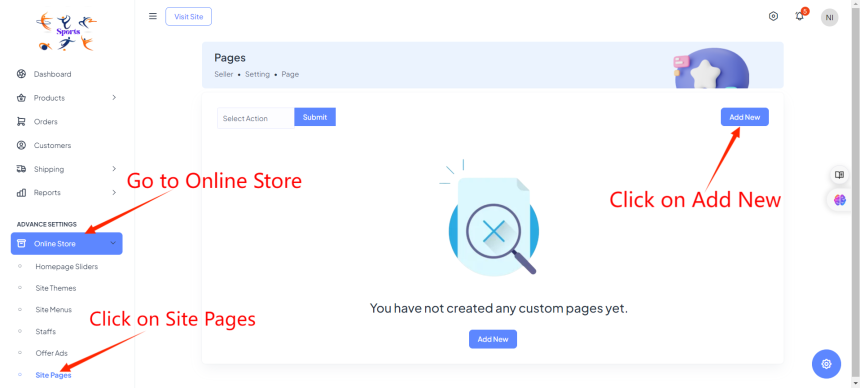
First login to your account. Go to Online Store and Click on Site Pages. After that, click on Add new. This initiates the process of creating a new custom page for your site.
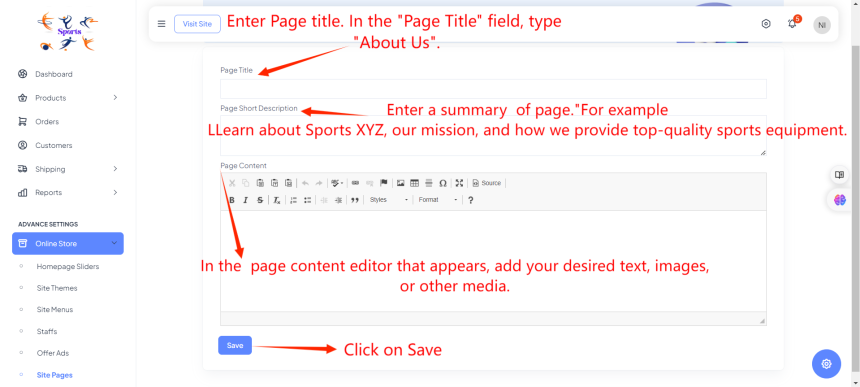
After clicking on Add New. In the "Page Title" field, type the title of your new page, such as "About Us". This title will appear at the top of the page and in the site's navigation. Find the "Short Description" field and enter a brief summary of the page. This summary helps with search engine optimization and gives visitors a quick overview of the page content. Use the content editor to add text, images, and other media to your page. Finally, click on Save