

Brodox Official
1 year ago
brodox.com
How to Add a Home Page Slider in Brodox
Enhance your online store’s appearance by adding a homepage slider in Brodox. Follow these simple steps to add and customize a slider with images, titles, and links.
Step 1: Navigate to Homepage Slides
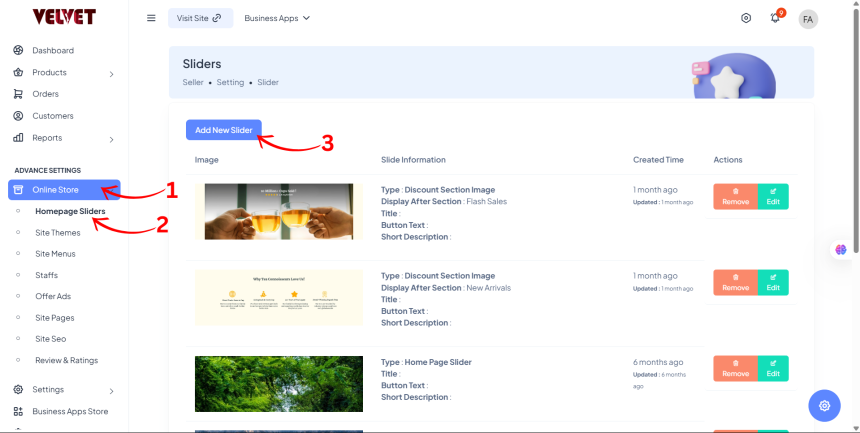
- From the Dashboard Sidebar, go to Advance Settings.
- Click on Online Store and select Homepage Slides from the dropdown.
Step 2: Add and Customize the Slider
- Click on Add New Slider.
- Choose the Type of Slider:
- Homepage Slider (1440px X 480px)
- Discount Slider
- Background Image
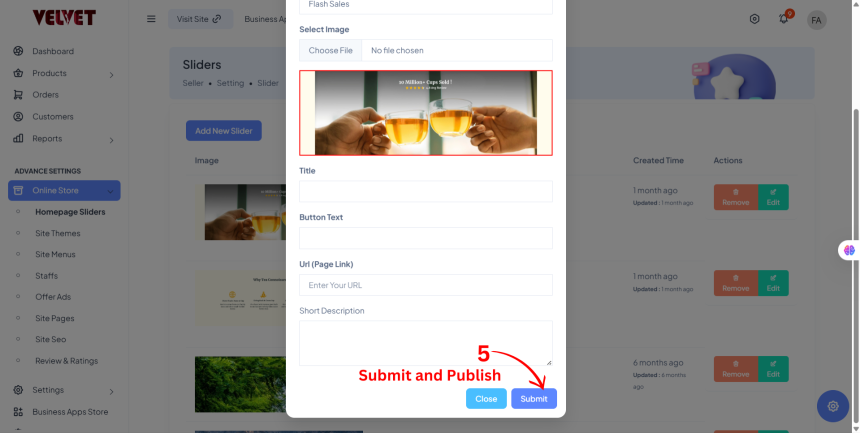
- Upload the Image for the slider.
- Enter a Title for the image.
- (Optional) Add Button Text, Page URL (Link), and a Short Description.

Step 3: Save and Publish
- Click Submit to finalize and display the slider on your homepage.
Your homepage slider is now set up in Brodox!