
Brodox Official
1 year ago
brodox.com
How to Set Up SEO and Sitemap for Your Store in Brodox
Boost your store’s visibility on search engines by setting up SEO and submitting your sitemap in just two simple steps.
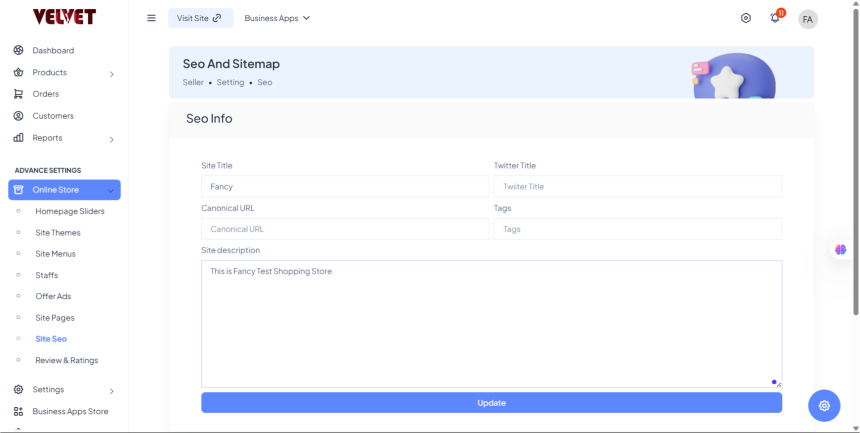
Step 1: Configure SEO Settings
Go to Dashboard → Settings → SEO & Sitemap.
Fill in the following details:
- Site Title – Your store’s name (e.g., Fancy Store).
- Twitter Title – The title when shared on Twitter.
- Canonical URL – Your store’s official link.
- Tags – Relevant keywords for search engines.
- Site Description – A short summary of your store.
Click Save to apply changes.
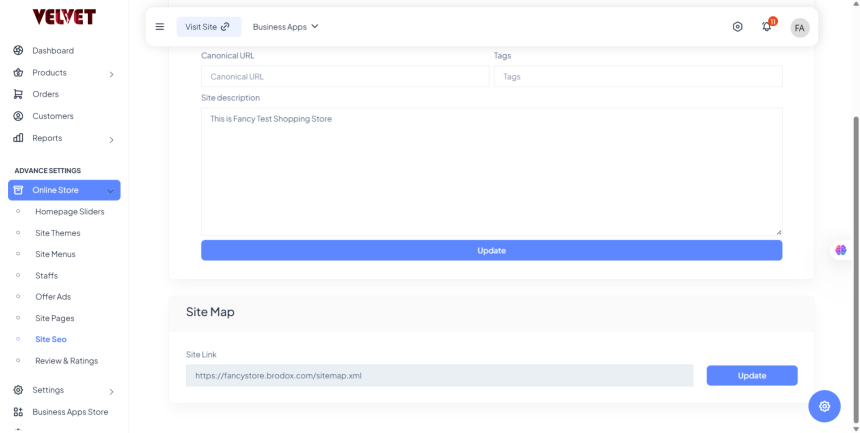
Step 2: Generate and Submit Sitemap
- Scroll to Sitemap Settings and click Generate Sitemap.
- Copy the Sitemap URL and submit it to Google Search Console for better indexing.
That’s it! Your store is now optimized for search engines, helping you attract more visitors.