

Brodox Official
1 year ago
brodox.com
How to Insert a Logo and Favicon for Your Store in Brodox
Easily customize your store's branding by adding a logo and favicon in Brodox. Follow these simple steps to update your store’s appearance.
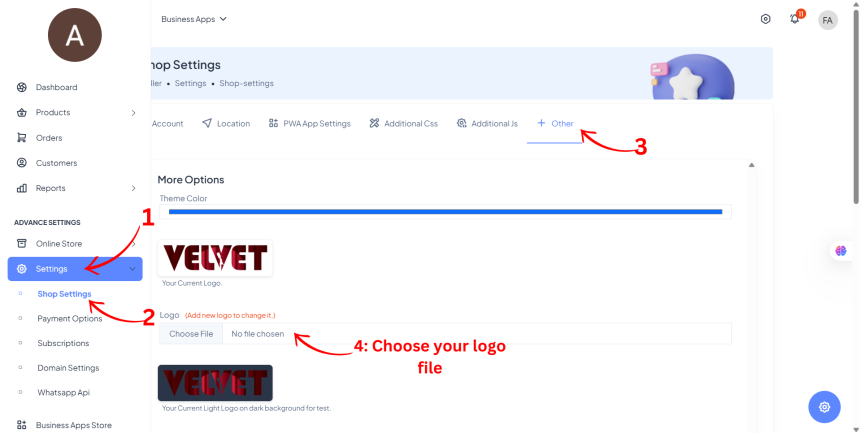
Step 1: Upload Your Store Logo
- From the Dashboard Sidebar, go to Settings → Shop Settings.
- Click on the Other tab.
- Choose and upload your Logo File (Recommended size: 480x150 px).
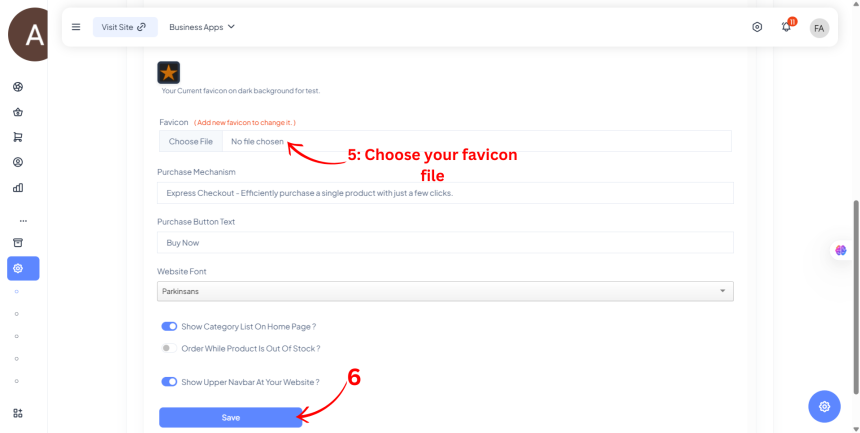
Step 2: Add Favicon and Save Changes
- Scroll down to the Favicon section.
- Click Choose File and upload your Favicon Image. (Use an Image to Favicon Converter if needed).
- Click Save to apply changes.
Your logo and favicon are now set for your Brodox store!