

How to view earning report in brodox?
To view the sales report in Brodox, simply navigate to the "Reports" section, select "Sales Report," and specify the desired date range. Brodox will then display a detailed summary of total sales within that period, providing valuable insights for business analysis and decision-making.
First login to your account. Go to Reports and Click on Earning Report.
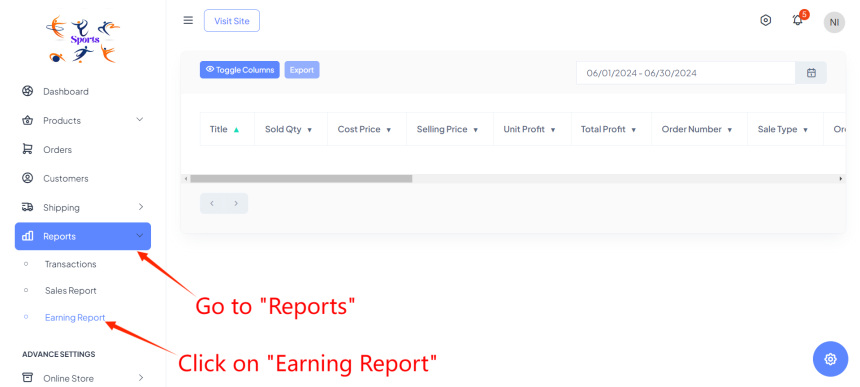
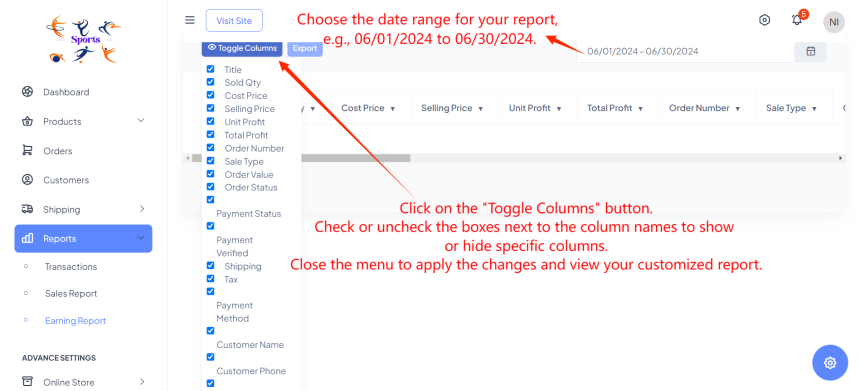
Start by selecting your desired date range from the date selector at the top right corner of the Earning Report page. This allows you to specify the period, such as from 06/01/2024 to 06/30/2024, ensuring you capture relevant financial data.
Next, utilize the "Toggle Columns" feature by clicking on its button. This action opens a menu where you can selectively display or hide specific columns by checking or unchecking the corresponding boxes next to the column names. Tailor your report to focus on essential financial insights like revenue trends, profit margins, and key metrics.
Visit our blog at blog.brodox.com to learn more about brodox.com and stay updated on the latest news. Thanks for visiting!